Pi Voice Keyboard
Voice-To-Text as a plug-and-play USB Keyboard
Various accessibility solutions can be found for people that are unable to physically use a traditional keyboard or other input devices. Unrelated are automated transcription services which exist for adding things like subtitles to videos. There exists an underserved place in-between, for people who have the full range of ability, but cannot to it for long, such as those with RSI, carpel tunnel, arthritis, etc. I have a disorder which puts be vaguely in that final category, and have often had to rely on tools to help me achieve more with less physical movement.
I am the kind of person who prints out key maps for the IDE and memorizes all of them to have an economy of keystrokes and achieve more with less input. Or I may make the most of one-off scripts and nix-y “everything is text” philosophy to make bulk updates for me. Those strategies doesn’t help when writing articles like this one, where there’s simply more volume of text. Similarly, some of the work that I would traditionally do through extensive repetitive keyboard work or manually scripted solutions are now handled through AI agents with which I must hold a conversation and describe needs in prose. All of this drives a need for much more activity through the use of natural language which eventually wears me out, especially during long sessions.
Although various voice-to-text solutions exist for different operating systems and ecosystems, a number of limitations exist. Some are application-specific, most are operating systems versus specific, and features for deep OS integration lead to fragility or incompatibility with any number of use cases. Work has required me to transition from Windows to MacOS to Windows to MacOS to GNOME+Wayland Linux to KDE+X Linux over the past few years, I’ve had to find, customize, or developer a different solution for each. Facing the prospect of translating my customized solutions yet again this time from ydootool back to xdootool, I thought there had to be a better way.
I’m completely satisfied with my Moonlander and it’s custom layout (see the tour, if you want), especially how the QMK customizations allow me to use the keyboard as a mouse, as well as create hard-coded macros for the awkward chords used in more specialized tools like IntelliJ. The ability to carry these configurations within the keyboard itself is key; any device I plug it into, or anything I switch between on my KVM, gets these benefits and has these capabilities. Sure, Windows has a Mouse Keys solution, and so does MacOS, and so does GNOME, and KDE has “Mouse Navigation”, but none of these work identically and most practically require movement across to a dedicated numpad.
I love that I can get all the benefits of my customized keyboard on whatever device I plug it into because there’s little more universally compatible than a plug and play USB keyboard. If my special USB keyboard can function as a USB mouse, I wished that I could have the same generalized compatibility for my voice typing as well. I could find nothing of the sort.
So, I made one.
Acknowledgements
This project as inspired by mkiol’s standalone dictation transcription app mkiol/dsnote, which demonstrated the possibilities of standalone transcription through various models. Neither that app nor this project would be possible without the availability of powerful speech recognition models, especially OpenAI’s openai/whisper, and the excellent work of Georgi Gerganov in ggml-org/whisper.cpp to make such integration possible. I’m standing on the shoulders of giants here.
Gallery and Demo
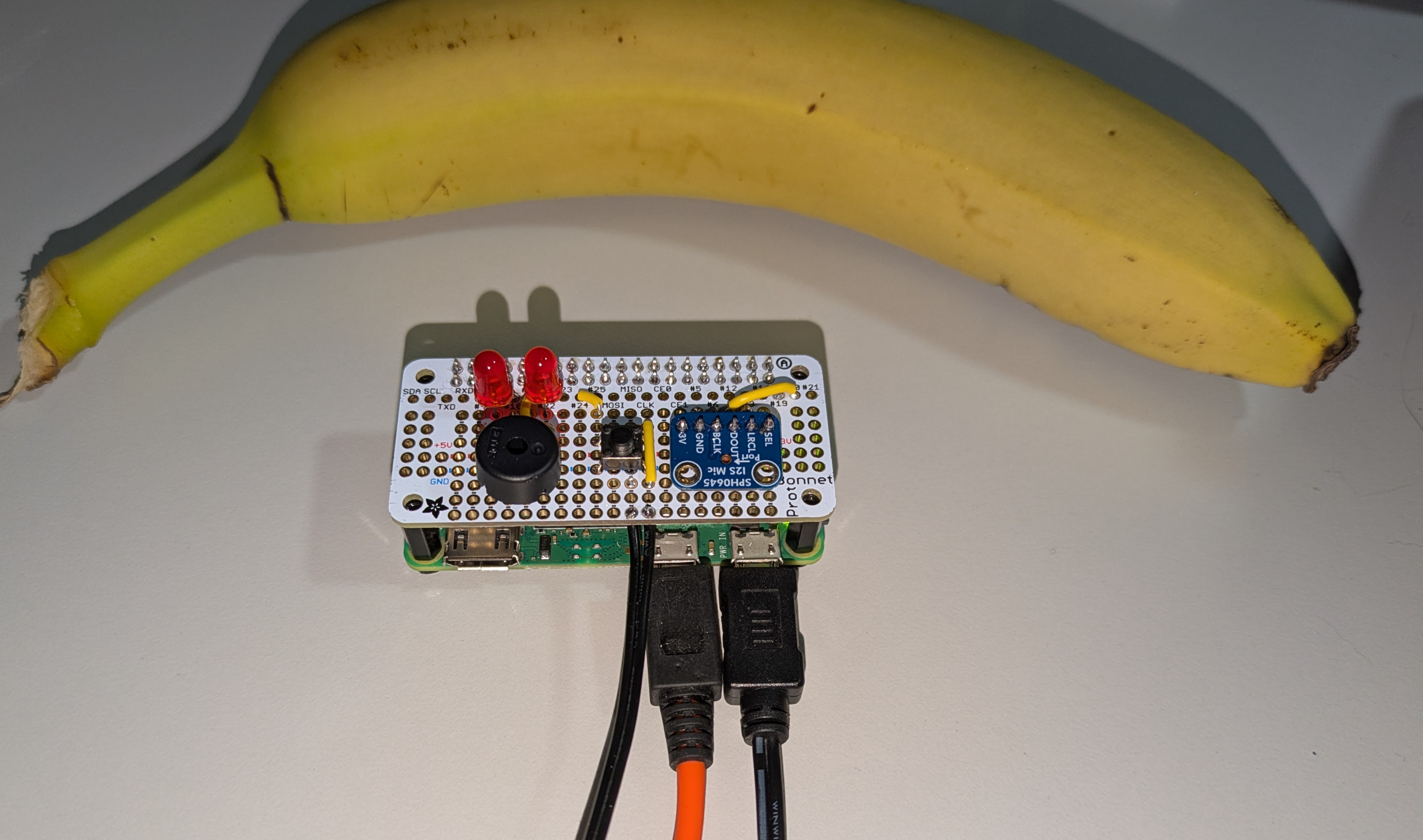
The device is a 1:1 scale model of itself


Required Components
- Raspberry Pi Zero 2 W
- Micro-USB Power Supply
- USB OTG Micro-USB to USB-A Cable (or Micro-USB to USB-C, depending on the target device you want to plug the “keybord” into)
- Linux host with a CUDA-capable NVIDIA GPU for transcription
- Or, alternative transcription service if you’re willing to make one; see “Future Work”
Functionality and Implementation
The project is built around a Raspberry Pi Zero 2 W, which is a small and affordable microcontroller with built-in Wi-Fi capabilities.
The Pi has a dedicated surface that accepts ASCII over a socket and simply types whatever it receives. (This is a local only connection over a Unix socket to avoid any security considerations.)
Audio recording is done by the device itself using an on-board microphone. Recording occurs while my foot pedal is depressed. This allows me to keep my hands on the mouse or keyboard (which, for me, is also a mouse) to change where my cursor is focused and and make edits or navigate around as I go, interlaced exactly the way that I would when typing naturally. Functioning literally as a USB keyboard from the OS’s perspective, there are no further limitation or compatibility concern. If you can use your keyboard to type it, you can use your mouth to type it…within reason, of course. I do still use the keyboard for a series of special characters, passwords, etc. The keyboard is going to be good at picking up sentences like the ones you are reading, but not the intangibles like “Page Up”.
Once captured, the audio is sent to a dedicated speech recognition service for transcription. Currently, the only service is one that runs a Whisper model, offloaded to a system with an Nvidia GPU on the local network. The reason for this is purely speed; it is challenging to compete with the pure power of using a GPU system for this purpose.
Source
https://github.com/gsprdev/pi-voice-keyboard
Other Transcription Services
The contract for the transcription service is intentionally simplistic and easy to swap out with others:
GET /healthreturnstext/plainstatus asOKor “other”POST /transcribeacceptsaudio/wavand returnstext/plain
That’s it. Theoretically, any HTTP service on the local network which can meet this contract could be used, although likely with less stellar performance than the GPU-accelerated Whisper model.
Future Work
I’m completely satisfied with the solution and use it all day, every day. Nevertheless, for robustness of the solution and to allow theoretical function when roaming, I intend to explore options for on-board processing using a whisper-tiny or a vosk model, or other types of transcription services which don’t require a specific combination of an Nvidia GPU on a Linux host with CUDA drivers.
Processing generally happens in about 0.15x real time, which feels virtually instantaneous. As it stands, that tremendous speed is necessary as not to break the cadence of overflow and train of thought. I should never feel that I’m waiting for the system to catch up with my speech. If a slightly more streaming or chunked interface could be designed, it may be possible to accept significantly slower transcription on-board.